NEW

v2.1.3 is out — Updated the SVG allowed elements.

Docs
Custom Style Controls · 14 blocks · 18 patterns

Build any WordPress section without leaving the block editor.

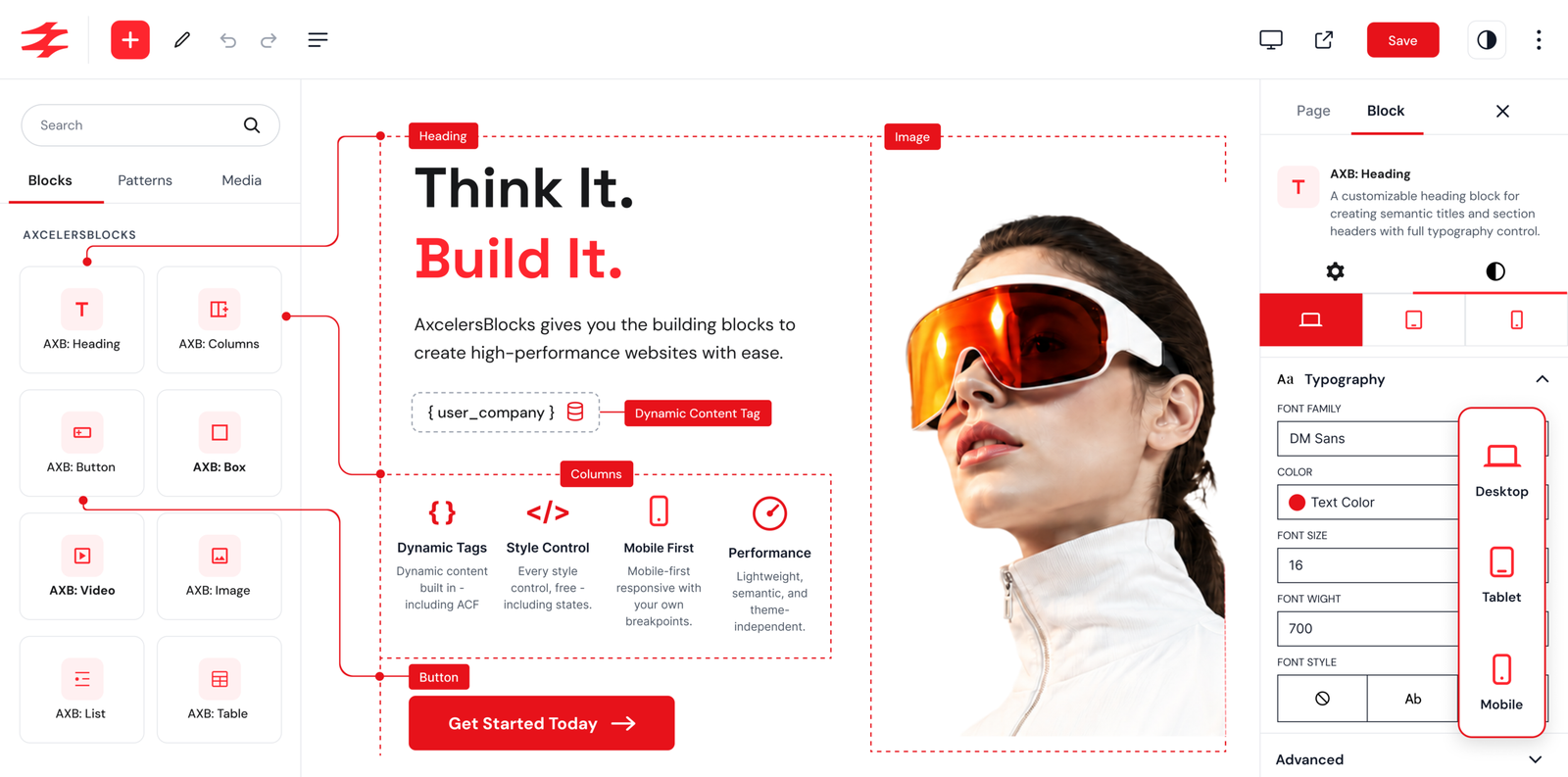
AxcelersBlocks gives you 14 fully styled Gutenberg blocks and 18 ready-to-use patterns — with responsive controls, dynamic content, and fine-grained styling for every device. Lightweight, fast, and free.
Download from WordPress.org

Built for WordPress builders

Listed on WordPress.org

GPL-2.0

14

Production-ready blocks

18

Pre-built patterns

3

Device breakpoints built-in

100%

Free & GPL-licensed

14 BLOCKS · ONE TOOLKIT

Every block you need to compose a page.

Drop them anywhere in the editor. Combine, nest, and style them per device — without writing a line of CSS.

AXB · Heading

Semantic titles with full typography control.

AXB · BodyCopy

Styled body text with dynamic content.

AXB · Button

CTAs with icon, link & hover styling.

AXB · Box

Flexible container for any layout.

AXB · Columns

Responsive flex/grid columns.

AXB · Column

Single column inside a Columns block.

AXB · Image

Media with SVG upload support.

AXB-video-block

AXB · Video

Self-hosted video or streaming-platform embeds

AXB · List

Ordered or unordered with custom markers.

AXB · List Item

Individual list item, override per item.

AXB · Table

Semantic tables with full style control.

AXB · Table Section

Group header / body / footer rows.

AXB · Table Row

Semantic row inside a section.

AXB · Table Cell

Semantic cell inside a row.

STYLING WITHOUT CSS

Designer-grade control. Built into the block editor.

Every property you’d reach for in CSS — typography, layout, spacing, effects — exposed as native Gutenberg controls. With per-device overrides and hover states.

Responsive controls

Set values per device — Desktop, Tablet, Mobile — with smart inheritance so your CSS stays lean.

Dynamic content

Pull post title, excerpt, meta, terms, and ACF fields directly into any block. Live previews in the editor.

Link & button states

Style links and buttons across hover, focus, and active states – without custom CSS or JavaScript.

Layout that scales

Flex and Grid built-in: direction, wrap, gaps, align, justify, grow & shrink — plus position, sizing, and z-index.

Effects suite

Box & text shadow, filters (blur, brightness, contrast, hue), and 2D/3D transforms (translate, scale, rotate, skew).

Performance-first CSS

Block-based CSS only loads what you use. No bloat. No render-blocking. Fast Core Web Vitals out of the box.

CHANGELOG

Always shipping. Here’s what’s new.

A steady cadence of new blocks, polish, and fixes. Every release is shipped openly — no surprises.

v2.1.3

Latest

July 2026

MAINTENANCE

  • Prefixed global variables in the uninstall routine to follow WordPress coding standards. No functional change — existing content is unaffected.

v2.1.2

June 2026

MAINTENANCE

  • Removed leftover debug console messages from Background layer controls.
  • Custom SVG icons in Heading and Bodycopy editor previews are now sanitized.
  • Added uninstall routine that removes plugin settings when deleted (including multisite).
  • Synced version metadata across plugin files. No block settings or defaults changed.

v2.1.1

June 2026

FIXED

  • Fixed the block style controls (the AxcelersBlocks side panel) appearing unstyled in the editor on block themes. The inspector control styles were loaded as a block style asset, which only reaches the editor canvas iframe; they are now loaded with the editor assets so the side panel renders correctly for every block on all themes.

v2.1.0

June 2026

NEW

  • Added an AXB: Table pattern category with three new patterns: Pricing Comparison, Product Specs, and Schedule.
  • Added an AXB: List pattern category with three new patterns: Feature Checklist, Two-Column Checklist, and Numbered Steps.

IMPROVED

  • Updated the existing Hero, CTA, Media with Text, Featured Post, and Testimonials patterns so their layout spacing is written explicitly into the pattern markup, making inserted patterns independent of block default values.
  • Block identity badges (Box, Column, Columns, Heading, Bodycopy, Button, Image, Video, List, List Item) now appear only while hovering that specific block, so the canvas stays clean. When blocks are nested, only the innermost hovered block shows its badge.
  • Refined the block icons in the inserter with tighter artwork.

v2.0.0

June 2026

NEW

  • Added a new AXB Video block: a semantic figure/video element with multiple sources, caption tracks, and a poster image, plus playback options (autoplay, loop, muted, controls, playsinline, preload), self-hosted and dynamic video sources, optional streaming-platform embeds (YouTube, Vimeo, Dailymotion) with WordPress oEmbed fallback, and the full AxcelersBlocks style controls.
  • Added a complete link styling model to the Bodycopy, Heading, and Image blocks, letting you style the link across its default, hover, focus, and active states — typography, text and background color, border, border radius, spacing, display, and effects.
  • Added focus and active interaction states to the Button block alongside the existing hover state across all style controls.
  • Added dedicated icon-container styling (background, border, border radius, padding, margin, alignment) to the Bodycopy, Heading, and Button blocks.
  • Added SVG element styling controls (sizing, positioning, display, and effects) for inline SVG icons.
  • Added content styling controls and an Outline control to the relevant blocks.
  • Expanded the Image block with flexbox and grid layout controls, dedicated image-element sizing (width, height, min, max, and border radius), and an optional empty-state placeholder.
  • Added image priority loading: mark your largest above-the-fold image (the LCP) to load it eagerly with fetchpriority=”high”, plus an explicit loading control (lazy, eager, auto).
  • Added link rel attributes (nofollow, sponsored, ugc) and a link title field for links across the relevant blocks.
  • Added ARIA label support across blocks for improved accessibility.
  • Added Blank and Full-Width page templates that work in both classic and block (FSE) themes, so you can build full-page layouts without theme chrome.
  • Added support for ACF (Advanced Custom Fields) values as dynamic content sources.
  • Added shared editor and frontend stylesheets for consistent styling across all blocks.

IMPROVED

  • Switched the responsive system to mobile-first: device styles now use min-width media queries (base styles apply to mobile and scale up to tablet and desktop) instead of the previous desktop-first max-width approach. Content built with earlier versions keeps its blocks and settings, but because the cascade direction changed, its responsive (tablet/mobile) appearance should be reviewed and adjusted after updating.
  • Rebuilt block CSS generation on a shared PHP engine with dedicated per-block render helpers for cleaner, more consistent editor and frontend output, and minified the generated inline CSS.
  • Fixed the per-block responsive controls so they stay in sync with WordPress’s native Desktop, Tablet, and Mobile preview buttons in both directions, by reading WordPress’s current stable device-type API. Switching device in either place now updates the other and resizes the editor canvas to your configured breakpoints.
  • Redesigned the Table block family: streamlined the table data model and added per-cell column span, row span, scope, and vertical alignment, configurable border spacing, and improved section, row, and cell structure handling.

FIXED

  • Fixed responsive positioning so absolutely-positioned elements keep their intended per-breakpoint offsets after the move to the mobile-first system. Previously, a side (top/right/bottom/left) set only on a wider breakpoint could inherit a narrower breakpoint’s value, shifting or stretching positioned elements; each breakpoint’s position is now self-contained.
  • Fixed the Columns block child synchronization so adding, removing, or duplicating columns from the block toolbar stays in sync with the column count, with reliable two-way updates that are no longer affected by editor timing issues.
  • Your existing blocks update without block recovery — no block shows an “unexpected or invalid content” notice. Because the responsive system moved from desktop-first to mobile-first, the tablet/mobile appearance of content built with earlier versions may differ and should be reviewed and adjusted after updating; your content and settings are not deleted.
  • The block-level hover styling previously available on the Bodycopy and Heading blocks has been replaced by the new link styling model; those blocks update safely, but any block-level hover styling set on them will no longer be applied.
HOW IT WORKS

From install to live in under 5 minutes.

No fiddly setup. No learning curve. Install the plugin, find AXB in the block inserter, and start composing your page.

01

Install

Search ‘AxcelersBlocks’ in your WordPress plugin directory and install with one click.

02

Activate

Turn it on. 14 new AXB blocks and 18 patterns instantly appear in your block editor.

03

Build

Drop blocks, pick a pattern, or remix one. Style per device, preview, and publish.

18 PATTERNS · READY TO USE

Start with a pattern. Ship in minutes.

Professionally designed, fully responsive, one-click to insert. Customize everything to match your brand.

AXB: Hero – Split (Text + Image)

AXB: Hero

AXB: Hero – Dark + Stats Row

AXB: Hero

AXB: Hero – Image Overlay Centered

AXB: Hero

AXB: CTA – Centered Banner

AXB: CTA

AXB: CTA – Split (Text + Button)

AXB: CTA

AXB: Media With Text – Image Left

AXB: Media

AXB: Media With Text – Text Left

AXB: Media

AXB: Media With Text – Stacked Centered

AXB: Media

AXB: Featured Post – Hero Card

AXB: Posts

AXB: Featured Posts – Editorial Layout

AXB: Posts

AXB: Testimonials – 3 Column Grid

AXB: Testimonials

AXB: Testimonials – Featured Centered

AXB: Testimonials

AXB: List – Feature Checklist

AXB: List

AXB: List – Two-Column Checklist

AXB: List

AXB: List – Numbered Steps

AXB: List

AXB: Table – Pricing Comparison

AXB: Table

AXB: Table – Product Specs

AXB: Table

AXB: Table – Schedule

AXB: Table

PRICING

Simple. Transparent. Free forever.

Use the full block library at no cost. Upgrade to Pro when you’re ready for AI assistance, advanced patterns, and Figma-to-WP imports.

STARTER

Free

For everyone. Always.

$0

/ forever

Download from WordPress.org

Includes

Blank & full-width page templates

All 14 AXB blocks

All 18 ready-made patterns

Per-device responsive controls

Link & button hover, focus, and active states

Dynamic content (post & ACF)

SVG upload + safer sanitization

Block-based CSS (no bloat)

Community support

PRO

Pro

Power-ups for serious builders.

Coming Soon

$59

/ year · early-bird

Everything in Free, plus

30+ premium blocks (forms, accordions, tabs)

100+ premium patterns & full page templates

AI-assisted block & pattern generation

Figma-to-WordPress import

Conditional visibility & display logic

Custom Feature Request

Priority support

All plans include lifetime updates and GPL-2.0 licensing. No credit card required for the free version.

FREQUENTLY ASKED

Quick answers, before you click install.

Anything else? Reach out on the WordPress.org support forum or open an issue on GitHub.

Yes — the core plugin with all 14 blocks and 18 patterns is 100% free under the GPL-2.0 license, with lifetime updates from WordPress.org. No credit card required.

AxcelersBlocks requires WordPress 6.8 or higher and PHP 7.4 or higher. It is tested up to WordPress 7.0.

No. AxcelersBlocks is designed for performance – follow the best practice for structuring HTML, use block-based style to avoid unnecessary CSS loading.

Yes! AxcelersBlocks does not depend on the theme. It can be used on any Block / FSE Theme.

No. AxcelersBlocks uses unique block categories prefixed with AXB.

Build your next WordPress section in minutes – for free.

Start building WordPress layouts faster with AxcelersBlocks.